Introducing the moderation inbox
October 30, 2026
by Aaron Rodericks
Starting today, the moderation inbox is available in beta in the Bluesky app. It brings most of your contact with Trust and Safety into one place: the reports you make, the actions we take on your account, and appeals. For the first time, you’ll also be able to see your account standing, so you’ll know whether you’re in good shape or at risk of suspension.
Why we built it
Until now, most of our moderation messages went out by email, and email presented two problems.
The first was coverage. We could only send email for the most serious decisions, primarily account and content takedowns. The sheer volume of adult-content labeling meant that it usually came with no message at all.
The second was reach. If your account was on an independent server (PDS), we had no way to get in touch with you. But the moderation inbox lives inside the Bluesky app. Anyone who uses the app can see their reports, get notices about their account, and file appeals there.
Now that all this information lives together in the app, we hope our moderation decisions will be easier to understand—and easier to challenge when you think we got one wrong.
What’s in the inbox
Your reports. When you report something to Bluesky, a record of it shows up in your inbox. You’ll get an update once we’ve reviewed it letting you know whether we took action or not. To help us assess the report, add a comment explaining why you believe the content violates our Community Guidelines.
Actions on your account. Moderation actions taken on your account and your content show up in your inbox. You can appeal these decisions in the same place. Suspensions are the exception, since they prevent you from accessing your account. You’ll still appeal those from the Bluesky app’s login screen.
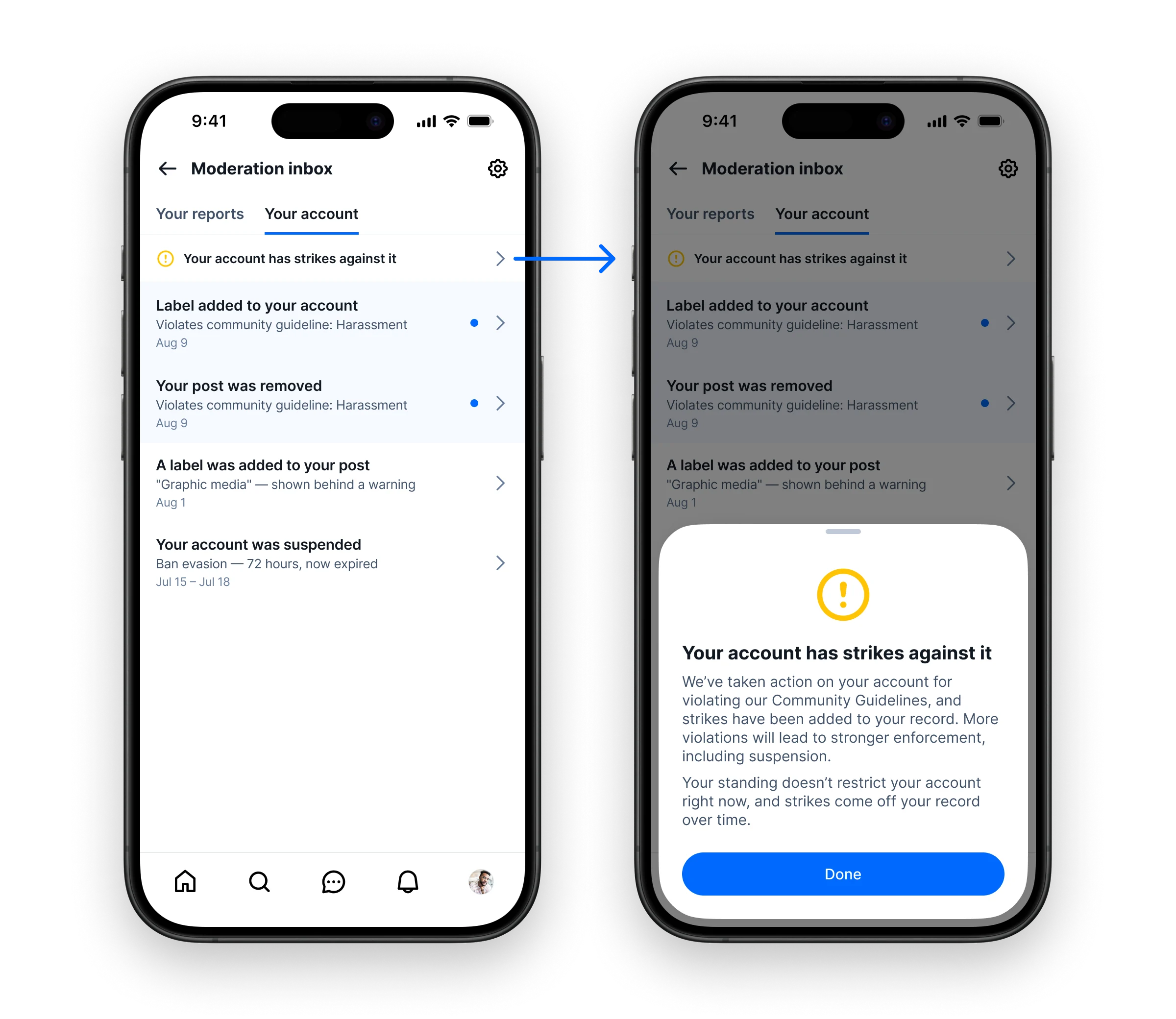
Your account status. This is the biggest step for transparency. You’ll be able to see your account’s overall standing, whether you have strikes against your account and whether you’re at risk of permanent suspension.
Account status and strikes
It’s easy to lose track of past enforcement actions, especially when they’re buried in your email. When that happens, a suspension can look like it was triggered by one post, when it was actually the cumulative result of several violations over time. The account status banner puts the full picture in front of you, so there should be fewer surprises. You’ll be able to see when your account has accumulated a handful of strikes or enough that it’s at risk of permanent suspension. Strikes don’t remain on your account permanently; they come off your record over time. We’ve written before about our strike system; we’ll share more details soon to help users understand it better.
The moderation inbox will start out empty, even if you have existing strikes on your account. You’ll be able to see your current status in the account status banner (shown below). If you don’t see a banner, you’re in good standing.
Notifications are on by default
In beta, the moderation inbox will send you notifications by default. You can turn them on or off separately for:
- updates on reports you’ve made
- notices about your account
- labels added to your posts
How to join the beta
- Open Settings.
- Go to Beta features.
- Select Enable beta features.
Then, to find the inbox:
- In Settings, open Moderation tools.
- Tap Moderation inbox at the top of the screen.
What’s next
The beta release gives us the chance to find and fix problems. Once we’ve worked through them, we’ll move to a general release as soon as we can.